Member Portal FAQ
To renew your membership, log in to the member portal.
Scroll down to "Your Member Info". 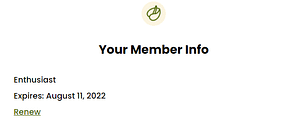 Select the renew button underneath your membership.
You will be taken to a new page to confirm your membership information and enter payment.
Click here for more information on membership levels
Yes. Please send checks to:
Palo Alto Art Center Foundation
1313 Newell Road
Palo Alto, CA 94303
You can update the credit card on file for your auto-renewing membership at any time by logging into your PAACF account and updating your payment method.
View step-by-step instructions here (PDF).
Please note: By maintaining an active auto-renewing membership, you authorize PAACF to automatically charge the credit card on file each year at the then-current membership rate for your selected level.
If you prefer, you may also update your card by emailing us at info@paacf.org or calling 650-617-3501 for assistance.
To upgrade a current membership log in to the member portal and scroll down to "Information".
Click on "Subscriptions" from the menu and select the Change Plan" button.
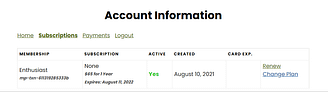
A screen will pop up with the prorated cost for the different membership levels. Select the level you want to upgrade.
You will be directed to a new page where you can confirm your membership and payment information.
Click here for more information on membership levels
If you decide to turn off auto-renewal, you can cancel at any time before your renewal date by visiting your PAACF account.
View step-by-step instructions here (PDF).
You may also email us at info@paacf.org at least 30 days before your renewal date, and we can assist you.
If you are having trouble logging on to your member portal, please try the following:
- Confirm you are using the correct email address and password.
- Reset your password using the link on the log-in page. If you don't receive the reset link, make sure to check your junk folder in your email.
- If you are still having problems logging in, please email us at Membership@paacf.org.
You can update your password anytime by logging into your PAACF account and changing to your desired password.
To register for members-only events, you will need to log into your member portal. You can log in through the account page or any event page.
Once you are logged in, you will need to complete the Eventbrite registration form.
Make sure you scroll all the way down on the form and enter all required fields.
Once you have successfully registered, you will receive a confirmation email from Eventbrite.

